
Sitting all day leaves many home workers stiff, tired, and sore by evening. A standing desk offers a simple fix: it lets you change position through the day without leaving your work. You do not need to stand all day to gain the benefit. Alternating between sitting and standing keeps your body moving, your energy up, and your back happier.
Why Standing Part of the Day Helps
Start by being honest about how you work. If you spend most of the day on video calls, you need a desk that stays steady when the camera is on. If you read and write in long blocks, you need a desk that changes height without disturbing your focus. Your work style decides which desk features matter and which are just noise. A standing desk fits a home office of almost any size.
Choose a desk with a smooth and quiet height adjustment. An electric desk with a motor moves at the press of a button and stops exactly where you want it. A manual desk with a crank costs less but takes effort, and you will adjust it less often. A desk that is hard to adjust becomes a desk that stays at one height, which defeats its purpose.
Check the weight rating of the desk before you buy, because monitors, laptops, and books add up fast. A desk rated for fifty kilograms may struggle with two monitors and a heavy desktop computer. Add up the weight of everything the desk will carry, and choose a desk rated well above that total. A desk that strains under its load will wobble and wear out early.
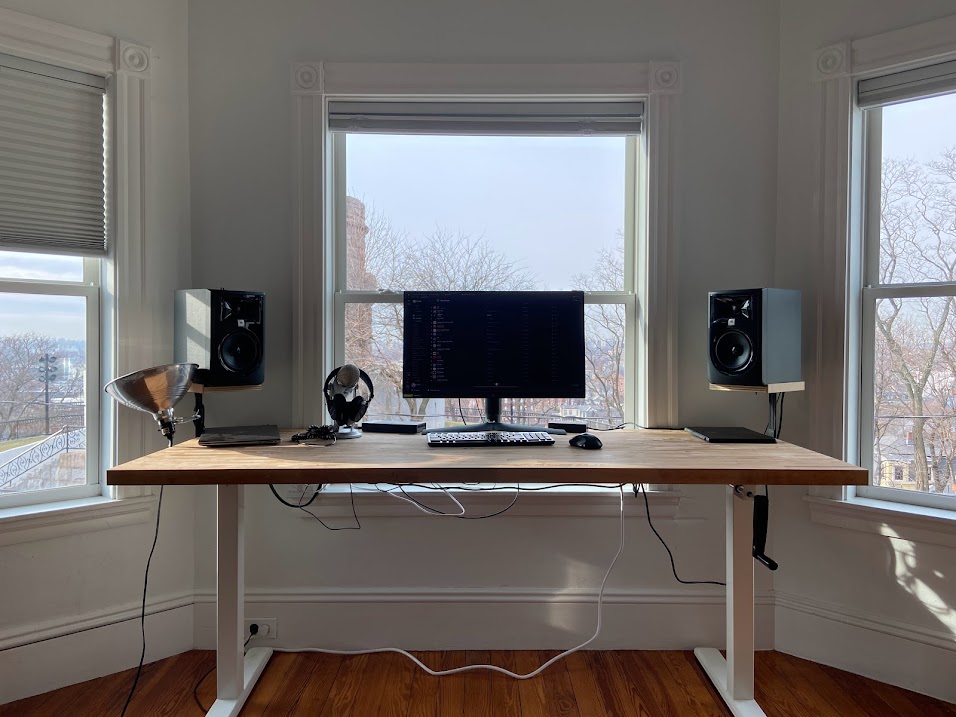
Choose a Desk That Adjusts Smoothly
Measure the desk surface against your work. A surface of about one hundred twenty by sixty centimeters holds a monitor, a keyboard, and a notebook with room to spare. A smaller surface forces you to stack items, which makes standing work awkward. A larger surface invites clutter, so choose the smallest size that holds your real work with a little room to breathe. A smooth and quiet adjustment keeps you changing height daily.
Set the sitting height so your elbows rest at a right angle with your feet flat on the floor. Set the standing height so your elbows rest at a right angle with your feet flat and your shoulders relaxed. Write both heights on a small card near the desk, or save them as presets if the desk has memory buttons. Presets turn a height change into a one second task.
Place the monitor at arm length with the top of the screen at or just below eye level. A monitor that sits too low pulls your head down, while a monitor that sits too high strains your neck. A monitor arm lets you move the screen when you change height, which keeps the screen right in both positions. A laptop on a stand with a separate keyboard works the same way.
Set the Right Heights for Sitting and Standing
Start with short standing periods and build up slowly. Stand for twenty to thirty minutes, then sit for an hour, and repeat. Your feet, legs, and back need time to adjust to standing work. A sudden jump to standing all day will leave you sorer than sitting did. A gradual routine builds the habit without pain. Start with short standing blocks and build up slowly.
Use a timer or an app to remind you to change position. It is easy to forget to stand when work gets busy, and easy to forget to sit when you are in flow. A quiet reminder every hour keeps the routine alive. After a few weeks, the change will feel natural and the timer can go away.
Build a Routine That Alternates
Stand on a supportive surface, because a hard floor punishes standing work. An anti fatigue mat cushions your feet and encourages small shifts in weight. Supportive shoes or bare feet on a mat both work, while thin socks on tile do not. A mat that is large enough to step around on keeps your feet comfortable through a long standing block.
Keep the area around the desk clear so you can shift, stretch, and move. A chair that rolls away easily, a clear floor, and a little room to pace all help. A standing desk in a cramped corner will feel like a punishment, while a desk with room to move feels like freedom. Give the desk the same clear space you would give a chair. An anti fatigue mat keeps feet comfortable on hard floors.
Keep the Desk Area Comfortable
Watch for signs that your setup needs a change. Sore feet mean you stand too long or stand on a hard floor. A sore neck means the monitor is too high or too low. A sore lower back means the desk height or the mat needs adjusting. Small pains are feedback, not failure, and a quick adjustment usually fixes them.
A standing desk works when it moves easily, sits at the right heights, and fits a routine of change. Choose a smooth desk, set both heights with care, and build the habit slowly. Standing part of the day will leave you fresher at the end of every workday.
Questions this article did not answer? Chances are Contemporary Home Office Color Schemes: Boost Focus & Style or one of the guides below covers it.
Reference: Standing desk — Wikipedia
Related Articles:
- Contemporary Home Office Color Schemes: Boost Focus & Style
- Velvet Home Office: Before and After Transformation Guide
- Decorate Home Office with Sofa: Tips for Style and Comfort
Designing your own space?
Tell us in the comments which idea you would steal for your home or project.
Share this with someone planning a build or renovation.